No longer available
Alternatives displayed on the right
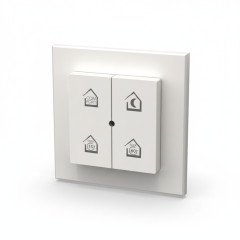
Renson OxyGreen Light Wireless 4-position control
{{ description }}
You save {{ discount.percentage }}%
{{ this.lastAddedShoppingCartItem.productable ? this.lastAddedShoppingCartItem.productable.displayName : '' }}
{{ lastAddedShoppingCartItem.productable.brand.display_name }}
Art. nr.: {{ lastAddedShoppingCartItem.productable.sku }}
{{ description }}

- Free delivery!
- No risk: free returns*
- Customer rating: 9.2/10
Description
The Renson RF Remote Control (Ref. 19137) is the perfect accessory to easily and wirelessly operate your Renson OxyGreen Ventilation Box. This elegant remote control, designed to be wall-mounted, gives you four different ventilation modes for direct control over your indoor climate. You switch effortlessly between basic ventilation, the comfort mode, the intensive boost mode, and the absence mode (night). This not only increases ease of use but also allows you to react quickly to, for instance, cooking fumes or a full bathroom.
Product Advantages
Wireless Freedom: The remote control works via Radio Frequency (RF), which ensures simple, wireless communication with the ventilation box.
Four Modes: You get direct control over the ventilation modes: Basic, Comfort, Boost/Intensive, and Absence/Night.
Easy Mounting: You can discreetly attach the remote control to the wall for a fixed and accessible operating location.
Ease of Use: You enable manual override of the automatic, demand-controlled ventilation.
Plug-and-Play: You can quickly and easily pair the remote control with compatible Renson OxyGreen models.
How do you pair the Renson 19137 with your OxyGreen Ventilation Box?
Pairing the wireless RF remote control (19137) with a Renson OxyGreen Ventilation Box is a simple process. Always consult the manual of your specific OxyGreen model for the exact procedure.
Activation Mode on the Ventilation Box:
You locate the pairing button or the pairing menu on the OxyGreen Ventilation Box itself. This is often a physical button on the unit.
You press the pairing button until the LED light on the box starts flashing (often green), indicating that the unit is in 'learn mode' (pairing mode).
Activation on the Remote Control (19137):
On the 19137 remote control, you press and hold the button for Basic Ventilation (usually the lowest setting or the house icon) for a few seconds.
The remote control is now transmitting the pairing signal.
Confirmation and Completion:
Once the pairing is successful, the LED light on the OxyGreen Ventilation Box will stop flashing and either light up solid green, or switch to another colour for confirmation.
You can test the operation of the remote control by selecting the different ventilation modes.
Please note: The 19137 is an RF accessory and may require a compatible RF receiver in the OxyGreen Ventilation Box. You should check the compatibility of your specific OxyGreen model before purchase.
Specifications
| Intovent article number | ITV0508013 |
| Manufacturer item number | 19137 |
| Type of electrical accessory/spare part | Control board |
| Accessory | Yes |
| Spare part | No |